A quiet watch by the door

Someone should be watching. It doesn’t have to be you.

You can’t call every Sunday to ask about Mom’s bank account. Rowan takes that shift — reading their statements, and yours, for the scams and the quiet charges that drain them. Read-only: we can see, but never move, money.

Your bank login never touches RowanNothing for your parent to install
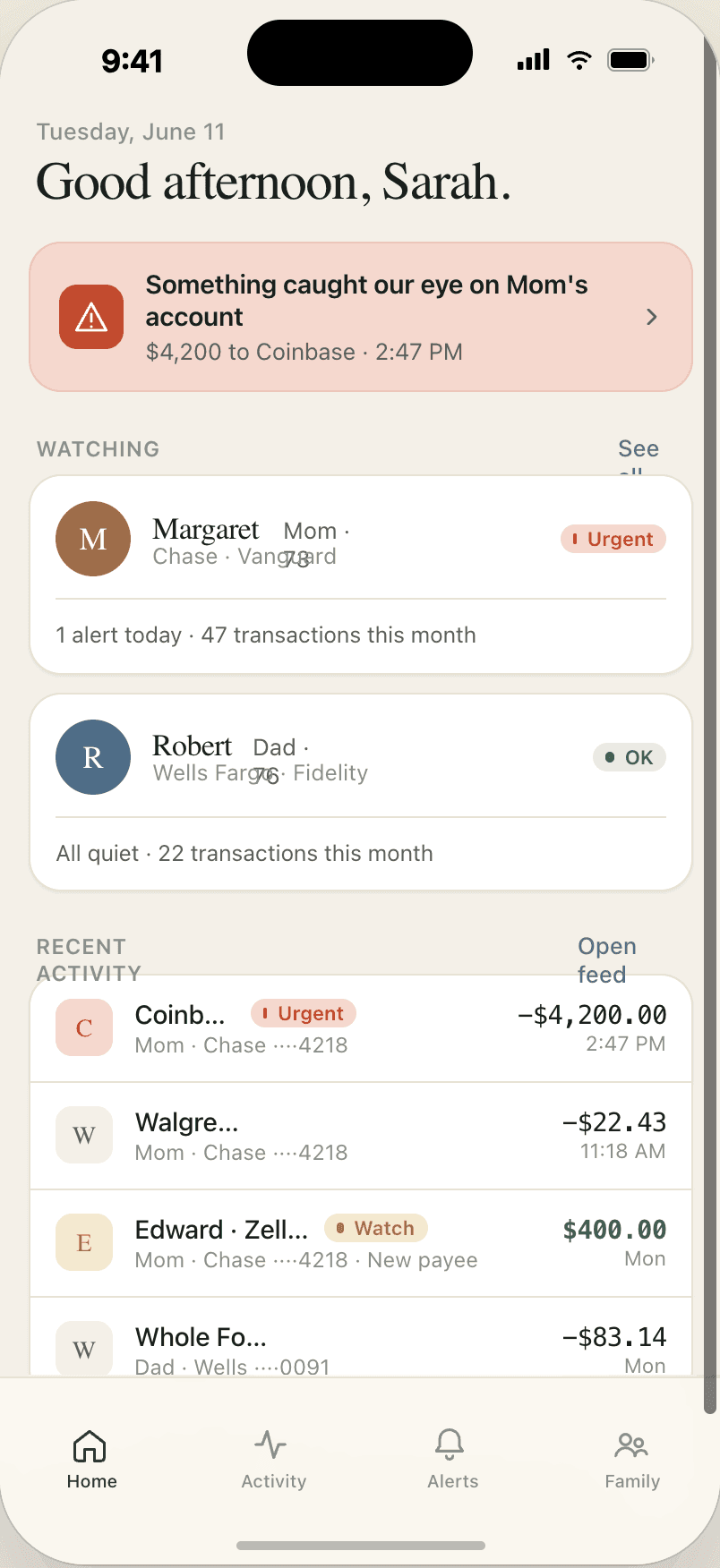
The Rowan app showing a calm overview of watched accounts
Found for you
$2,340/yr in recurring charges
2 you may have forgotten · 1 price hike
On Mom’s account
Something caught our eye
A first-time crypto transfer, after 5 small tests. Worth a call.
Example — illustration, not real accounts
One engine for your money and the people you watch overBank connections through PlaidRead-only, always
One watch, not two products

It starts with your own money.

The detection that finds your forgotten subscriptions is the same detection that reads an aging parent’s account for a scam. You’re the first person on it — free, no card. Adding someone you look after is the next step, not a different Rowan.

Start with you

Know what’s about to charge you.

Rowan watches the charges that repeat on your accounts and says what’s coming before it lands — along with the ones that crept up, went quiet, or are running on two accounts at once. Free, no card.

See what’s coming up
Then add someone

Stop being the one who checks.

You can ask how they’re doing without having to ask about their bank account. The same watch reads an aging parent’s account for the scams that drain life savings, and tells you when there’s something worth a call. There’s nothing for them to download.

Add someone you look after
For you · free

Know what’s about to come out.

Rowan reads your accounts — read-only — and, for the charges it can see repeating, works out when the next one lands. An annual renewal, or a single charge of $100 or more, is worth interrupting you for, so we do — up to a week ahead. Several in the same week arrive as one note rather than a pile of them. The rest sit in a list you can read whenever you like.

It still tells you the things you can only learn afterwards — a price that crept up, a subscription that’s gone quiet, the same service billing two of your accounts — and it writes on Sunday either way, including the weeks when nothing happened.

Told on Tuesday that $312 leaves on Friday, you can decide. Told on Saturday, you can only be annoyed.
Start with your own accounts

Free, and no card. Adding someone you love is the only thing that ever costs; what’s here stays free.

Coming up
3 due
Auto insurance heads-up
Renews in 3 days
$312.00
Cloud storage heads-up
Renews in 6 days
$99.99/yr
Music streaming
Renews in 12 days
$11.99/mo
Example — not a real account

When C+R Research asked 1,000 people what they spend on subscriptions each month, the average guess was $86. Counted service by service, the real average was $219 — about $1,600 a year more than they thought. That isn’t carelessness, and it isn’t all waste: a charge you’d gladly pay for is still one you can be caught by. Rowan has no opinion about whether a subscription is worth it. What it can do is tell you the next one is coming.

FiguresC+R Research, Subscription Service Statistics and Costs — 1,000 U.S. consumers, surveyed April 22–May 2, 2022.
Worth a call · on Margaret’s account
Something caught our eye
3 gift-card purchases at Best Buy today — $1,500 total, and unusual for this account.
1
No history of buying gift cards on this account.
2
All three within an hour — the shape of a tech-support or “settlement fee” scam.
Example alert — not a real account
For someone you love · catches scams

The scams that empty a retirement account don’t look like scams.

Pig-butchering, romance, tech-support, IRS impersonation, lottery “fees.” Rowan knows the patterns — escalating crypto transfers, a new payee getting three wires in a day, gift cards bought in a panic — and raises a gentle, specific flag, while there’s still a call worth making.

Then it hands you the call. What to open with, what they’re likely to say back, and how to leave it if it gets tense — plus the account and the transactions written up the way a bank’s fraud line will ask for them.

You make the call. You just don’t make it cold.
Why now

It happens to careful people. Every day.

These are the FBI’s numbers, from its 2025 Internet Crime Report. We haven’t rounded any of them up.

$7.748B
reported lost by people over 60, in 2025 alone
59% more than 2024
201,266
complaints filed by people over 60
37% more than 2024
$38,500
average loss, per person
and 12,400+ of them lost over $100,000 each
$352M
of that in complaints that referenced AI
the first year IC3 tracked it

It isn’t a lapse of judgment. The largest category of losses among people over 60 last year was investment fraud — $3.52 billion of it. That’s the patient kind: a wrong number, a polite apology, a friendly conversation that runs for months before anyone mentions money. Losing $38,500 to that is not something that happens to people who aren’t paying attention.

And it’s changing shape. 2025 was the first year IC3 tracked whether a complaint referenced AI. More than 3,100 of those complaints came from people over 60, and they account for over $352 million.

These are only the ones who said something. FTC research puts the share of fraud victims who ever complain to a government agency or the Better Business Bureau at fewer than 1 in 20. The real figures are larger, and nobody knows by how much.

FiguresFBI Internet Crime Complaint Center, 2025 Internet Crime Report (over-60 section; all-ages totals were 1,008,597 complaints and $20.877 billion). Reporting rate: Federal Trade Commission, Consumer Fraud in the United States, 2011.
How it works

Set it up once — and once more, the day you add someone.

You start with your own accounts, free. Adding someone you look after picks up where that leaves off — the same setup, one step further along, and there’s still nothing for them to install.

First — your own accounts
1

Connect your bank

Through Plaid, read-only. Your credentials go to the bank, never to us.

2

Rowan gets to work

It finds recurring charges and price hikes, and quietly watches for anything that looks off. Free, no card.

Later — when you add someone
3

You do this part once

Say who you’re watching over, and add a card. That’s setup — the watching itself never lands back on you.

4

You send one text, from your own number

We draft it; it goes out from your phone, so it lands in a thread they already trust. They follow the link to connect their bank — nothing to install, no account, no password shared with us, and no power of attorney needed.

5

Rowan takes the shift

It reads the statements so you don’t have to — yours and theirs. When something’s worth your attention you hear from us, with the reasons and what to say when you call. They never see a dashboard.

What’s inside

One engine, quietly thorough.

Catches scams
Five scam patterns
Pig-butchering, romance, tech-support, IRS, lottery — each read from multiple signals.
Every alert tells you why
Plain-English reasons, never a black-box score.
Tuned against false alarms
Low-stakes signals wait quietly in the feed instead of buzzing your phone.
And what to do about it
A script for the call, and the account details a fraud line will ask for.
Watches what you pay
Renewal radar
What’s due next, and a heads-up before the big ones land.
Subscription finder
The recurring charges we can see, in one place — including the ones that have gone quiet while the charges keep coming.
Price-hike alerts
“Netflix went $15.49 → $17.99.”
Duplicate-charge flags
The same subscription running on two of your accounts.
Tells the right person
Your parent connects from a text
One tap on the link you send — nothing for them to install.
Trusted-contact routing
Loop in a sibling or caregiver so the alert reaches whoever’s closest.
Weekly digest
A Sunday “all’s well” receipt — even when nothing happens — ending with what’s due next.
Built to be trusted
Read-only, always
Rowan can see, but never move, send, or freeze money.
Your bank login never touches us
Connections run through Plaid; we never see or store your bank password.
One bill for everyone you watch over
Put Mom and Dad on your own card — not two subscriptions to keep track of.
Trust & safety

The promises we can’t break.

A stranger texting your parent about their bank is the exact shape of the thing we’re trying to stop. So we don’t ask you to take trust on faith — we build it into what Rowan is, and isn’t.

How we protect your data →

Read-only, always

Rowan can never send a payment, transfer, or freeze a card. If that changes, it’s a different product.

Your bank login never touches us

Connections run through Plaid. We never see or store your bank password.

You always see why

Every flag explains itself in plain English. No mystery scores.

Nothing for your parent to install

One text, one tap. They’re never asked for a password by us.

We never sell your data

Your financial life isn’t a product. We watch it; we don’t monetize it.

Leave anytime

Disconnect from the app, or reply STOP to any text if you’re the one being watched over. Your bank connection and everything we learned from it go with it.

We never send the invite — you do

It goes out from your phone, in your own words. The only texts we ever send them are a hello when they connect, so they have our number, and then messages about their own account: a bank connection that needs refreshing, or a payment that didn’t go through. Everything else we send them is a reply — forward us a text that looks off and we’ll say what we think of it. They start that one, not us.

Why Rowan

One product for you and your parents.

Elder-fraud monitoring is not a new idea — it’s just always been sold to the person being watched. Here is what the other two cost, and who they ask to sign up.

 
Rowan
Carefull
EverSafe
Watching a parent
Rowan$8/mo — $5/mo each parent after, about $13/mo for two
Carefull$29.99/mo — one membership covers two people
EverSafe$16.99/mo per person — elder-fraud monitoring starts at their Plus tier
Watching only yourself
RowanFree
Carefull$29.99/mo — the same membership
EverSafeFrom $7.49/mo — Essentials, up to $26.99/mo for Gold
Who can be covered
RowanYou, plus any parent you watch over — they never make an account.
CarefullTwo people on one membership.
EverSafeThe adult child of an aging parent, a caregiver, or a professional serving older clients.
Who the alerts reach
RowanYou. Your parent never sees a dashboard.
CarefullThe member; Trusted Contacts get view-only access.
EverSafeEverSafe lets you designate others to receive alerts.
FiguresCarefull and EverSafe list prices, monthly billing, read from their own public pricing pages on August 6, 2026. Both discount annual billing, and EverSafe lists a senior discount. Their prices change; ours are on this page either way.

Your parent installs nothing

No app, no account, no password to remember, no screen to learn. They follow one link to connect their bank; after that we only text them about their own account — a hello when they connect so they have our number, a bank connection that needs refreshing, or a payment that didn’t go through. Everything else we send them is a reply to something they sent us.

Every alert explains itself

Plain English, and the reasons we thought it was worth telling you — never a score you have to take on faith.

Pricing

What the $8 does while you’re at work.

You’re the first person on it, and that part never costs anything. The only thing you ever pay for is someone else.

You
Free

Watching your own money is free, and stays free. No card.

Renewal radar, subscription finder, forgotten-subscription and price-hike flags, and the Sunday digest.
The first person you add
$8/mo

$5/mo each additional · about $13/mo for two, on one bill.

Or $70/yr, $45/yr each additional — about $115/yr for two. Paying by the year saves $26/yr.

Join the waitlist
We’re onboarding families in small batches. No card until you’re in.
  • Watches for five scam patterns — pig-butchering, romance, tech-support, IRS, lottery, each read from several signals.
  • Says why it spoke up — plain English and the actual reasons, so you can judge it yourself.
  • Tells you what to say when you call — the opener, the pushback they’ll give, and a way out if it gets tense.
  • Writes the bank call down for you — the account, the transactions and the reasons, ready to read to a fraud line.
  • Writes on Sunday either way — including the weeks when nothing happened, which is most of them.
  • Looks for the quiet money on their account — forgotten subscriptions and prices that crept up, the same as it does on yours.
  • Never moves a dollar — read-only, and they never have a dashboard to worry about.

One person is $8 a month, or $70 a year if you pay yearly — $96 against $70 over twelve months. One forgotten $9.99 subscription, found and cancelled, is $120. We won’t promise you that trade — we can only find what the statements actually show. What’s new is where we look: their account, not just yours.

What the alternatives cost is just above, with the date we checked.
Free tool · no signup

Got a text that feels off? Paste it here.

Rowan reads a suspicious text, email, or link and tells you, in plain English, whether it smells like a scam. No account, no catch — just a second opinion when your gut says something's wrong.

More about Second Look →

Free tool · no account needed
Coming soon

Be watching before the scammer is.

We're onboarding families in small batches. Leave your email and we'll write to you the day your spot opens — no card, no commitment.

We onboard in small batches, in the order people join.
Questions

The things people ask first.

Can Rowan touch my money?

No. Rowan is read-only — it can see transactions to spot problems, but it can never move, send, or freeze a cent. That limit is built into how we connect.

Does my parent have to install anything?

No. They get one text, tap once to connect, and that’s it. No app, no account, and no password is ever given to us.

Do I need power of attorney?

No. Nothing gets filed and no bank has to approve anything — they connect their own account once, through their own bank’s sign-in. If you already have power of attorney, Rowan doesn’t ask for it either. It isn’t a substitute for one, though: power of attorney lets you act on someone’s behalf, and Rowan only ever lets you see.

Will Rowan text my parent out of the blue?

No. We never send the invite — it goes out from your phone, in your own words. The only texts we ever send them are a hello when they connect, so they have our number, and then messages about their own account: a bank connection that needs refreshing, or a payment that didn’t go through. Everything else we send them is a reply — forward us a text that looks off and we’ll say what we think of it. They start that one, not us.

How does it catch scams?

It watches for the patterns behind pig-butchering, romance, tech-support, IRS, and lottery scams — escalating transfers, new payees, panic gift-card buys — and flags them in plain English, with the reason.

If it finds something, does Rowan handle it?

No — and it can’t. Rowan is read-only: it can’t move money, freeze a card, or call a bank. What it does is make sure you’re not starting from nothing. The alert comes with the reasons it fired, a script for the call — what to open with, what she’s likely to say back, how to leave it if it gets tense — and the account and transactions written up the way a fraud line asks for them.

Will it blow up my phone with alerts?

No — that’s the whole design. Low-stakes things wait quietly in the feed, and we push only when something looks worth your attention.

Is my banking data safe?

Connections run through Plaid, which is used by apps like Venmo and Robinhood. We never see or store your bank password, and we never sell your data.

Can I watch more than one person?

Yes — add both parents, or yourself and a parent. You pick who pays when you send the invite: put them on your own card and it stays one bill however many people you watch over, or let a parent pay for herself.

What if I want out?

Disconnect anytime from the app. Or, if you’re the one being watched over, reply STOP to any text. Either way we stop monitoring, disconnect the bank, and delete the transactions we synced along with every alert we built from them.